
Inside GitLab CI: From YAML to Green Check
The pipeline behind the pipeline

Between your git push and that green checkmark, GitLab has to parse, construct a dependency graph, persist hundreds of DB rows, coordinate a fleet of workers, stream live logs, and propagate changes through a state machine — all without starving other tenants on shared infra.
This article follows the steps that GitLab takes for you after you push a commit.
TL;DR
Pipelines are declared in
gitlab-ci.yml, then compiled into an internal job graph and persisted in Postgres.Jobs move through states like
created→pending→running→successMerged results pipelines validate your changes against the current
main.Merge trains validate your changes against the eventual
main.This is all based on dependency graphs, producer-consumer queues, and optimistic validation.
YAML → Postgres
Step 1 — Git event received. GitLab Shell (SSH) or Workhorse (a Go reverse proxy) receives the pack data, stores it via Gitaly (gRPC for git data), and triggers a post-receive hook.
Step 2 — Ci::CreatePipelineService runs. Rails fetches the YML via a Gitaly GetFile RPC. The YAML goes through several passes:
include:directives are resolved — local files, project templates, even remote URLs. This is recursive and can get deep.Variables like
$CI_COMMIT_SHAAND$CI_PROJECT_NAMEare interpolated.rules:,only:, andexcept:are evaluated against the pipeline context (branch, commit message, changed files, schedule) to determine which jobs actually apply.needs:relationships are resolved into the DAG (more on that later)
Step 3 — Everything is written to PostgreSQL in one transaction:
After GitLab parses .gitlab-ci.yml, it stops treating the file as the source of truth. Instead, it compiles that config into relational rows. One row represents the pipeline, a few rows for its stages, one row per job represents runnable work, and extra rows for dependencies.
In other words, GitLab turns your YAML into a small execution graph stored in PostgreSQL. That graph is what the scheduler and runners operate on later.
Here’s pseudo data to help visualize what things are like in Postgres:
PIPELINE
  5001  main@abc123  status=created

STAGES
  6001  build   pipeline=5001
  6002  test    pipeline=5001
  6003  deploy  pipeline=5001

JOBS
  7001  compile  stage=6001  status=created
  7002  rspec    stage=6002  status=created
  7003  jest     stage=6002  status=created
  7004  ship     stage=6003  status=created

NEEDS
  7002 needs compile
  7003 needs compile
  7004 needs rspec
  7004 needs jest
Here is what a simplified ci_builds row looks like at creation:
SELECT id, pipeline_id, name, stage, status, runner_id, yaml_variables
FROM ci_builds
WHERE pipeline_id = 99801;

-- id      | pipeline_id | name           | stage | status  | runner_id
-- --------|-------------|----------------|-------|---------|----------
-- 4410023 | 99801       | lint           | test  | pending | NULL
-- 4410024 | 99801       | unit-tests     | test  | pending | NULL
-- 4410025 | 99801       | docker-build   | build | created | NULL  ← waiting on stage order
Note that a job in created is still invisible to runners at this point; it exists in the DB but is not yet in the queue.
Step 4 — Ci::InitialPipelineProcessWorker is enqueued.
This Sidekiq job calls ProcessPipelineService, which evaluates the DAG, finds all jobs whose dependencies are satisfied, and transitions them from created → pending.
A job in pending is now on the ticket rail, so runners can see it.
Postgres → Runner
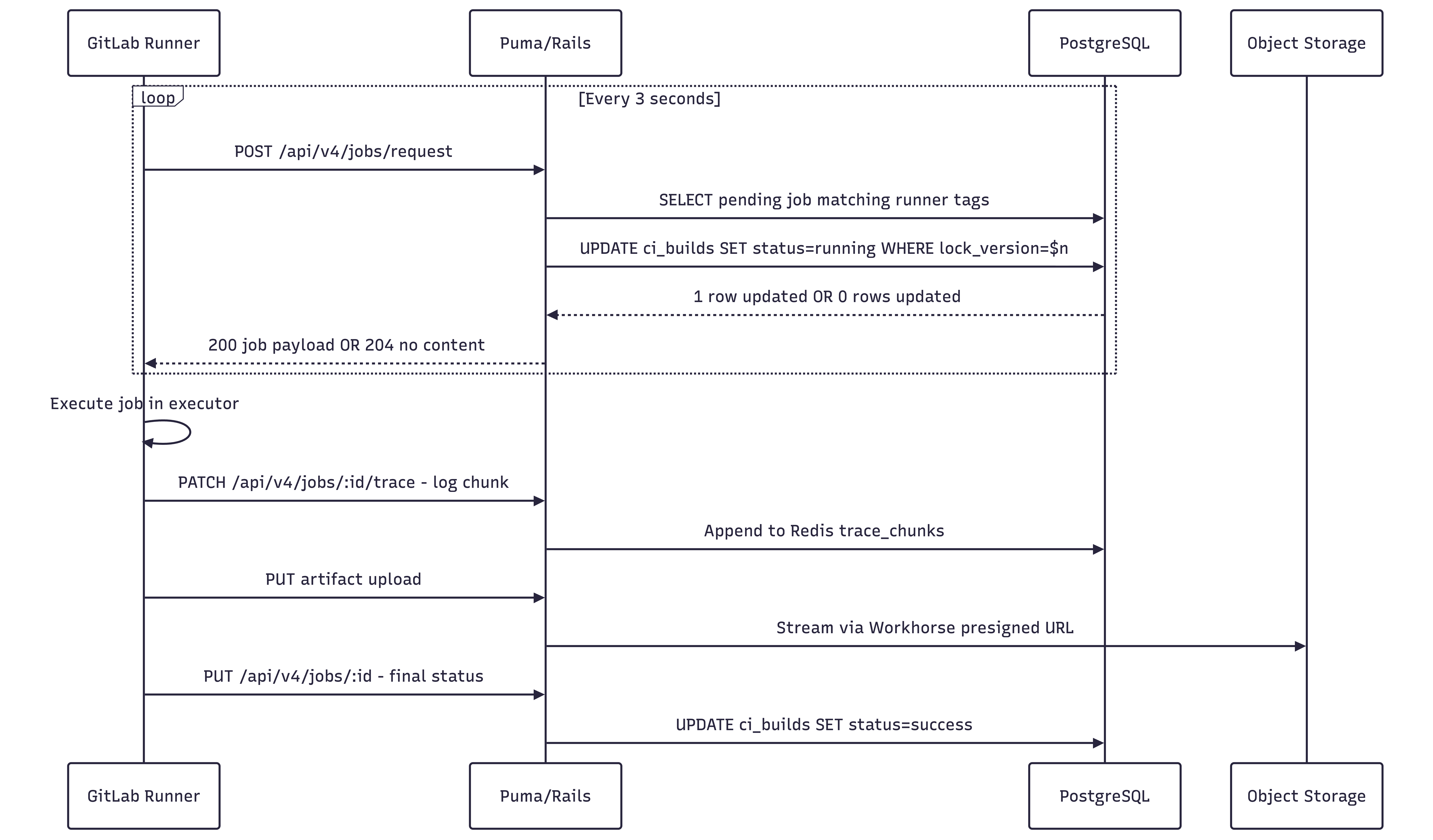
Runners poll POST /api/jobs/request every ~3 seconds. On the Rails side, this hits Ci::RegisterJobService, which:
Queries
ci_buildsfor pending jobs matching this runner’s tags and project accessAttempts to atomically transition the selected job from
pendingtorunningusing optimistic lockingIf the update succeeds, it returns the full job payload — env variables, Docker image, scripts, artifact definitions, etc.
If another process won the race, it returns
204 No Content, prompting the runner to retry next cycle.
Runner → Green Check
Workflow 1: Merge Requests
Merge request pipelines answer the baseline CI question: “Did my change work?” When you push, GitLab ensures you can build, test, lint, and deploy that change in isolation by testing a temporary merge commit that combines source and main. Nothin’ fancy here.
Workflow 2: Merge Trains
“Will Cory’s code break mine if it gets in first, though?”
Now you’re asking the right question.
When you’re working on your side project, you don’t need to worry about this. You’re the only one merging into main, so if it passes on your branch, it’ll pass in main. On a collaborative project with many changes landing at once, however, this isn’t guaranteed: two branches that each pass CI individually might conflict when combined.
Merge trains address this by testing the result of merging your branch into the target, rather than your branch in isolation.
A merge train is a queue of Merge Requests (MRs), where each is compared to earlier ones to ensure they all work together.
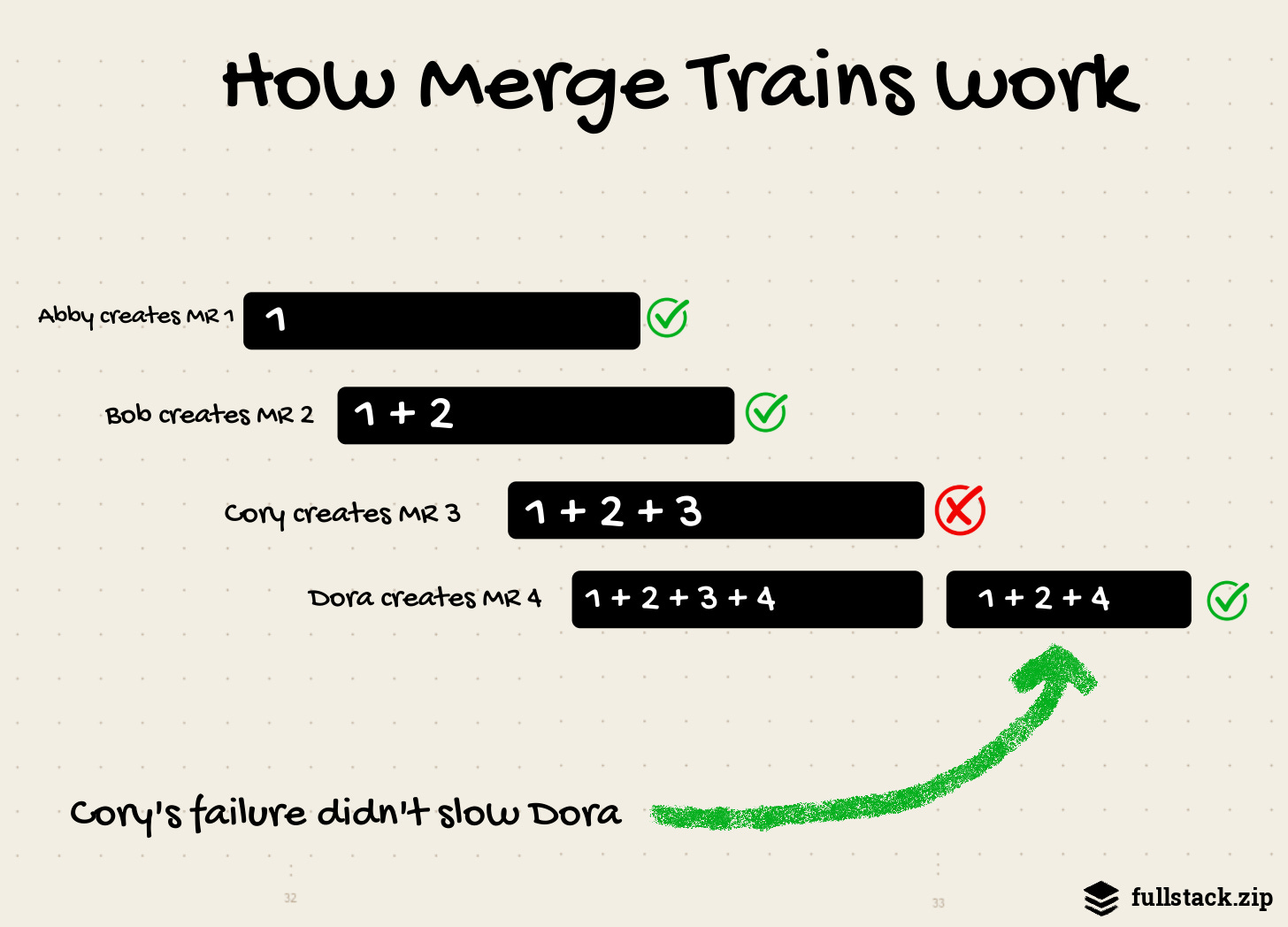
For example:
Four merge requests (M1-M4) are added to a merge train in order, which creates four merged results pipelines that run in parallel:
The first pipeline runs on the changes from M1 combined with
main.The second pipeline runs on the changes from M1, M2
,andmain.The third pipeline runs on the changes from M1, M2, M3, and
main.The fourth pipeline runs on the changes from M1, M2, M3, M4, and
main.
If M1 completes successfully, it merges into main, while the other pipelines continue to run. Any new MRs added to the train include the M1 changes from the target branch, along with the other changes from the merge train.
That’s the happy path.
Here’s where it gets fun.
If the pipeline for M3 fails:
M1 and M2 continue to run.
M3 fails and is removed from the train.
A new pipeline starts for the changes from M1, M2, M4 and
main(without M3).
The payoff: M4’s dev got the changes from M1 and M2 without manually restarting their pipeline. Without merge trains, M4’s dev would either be waiting around for M1 and M2 or removing M3’s crappy code.
While this “speculative thing on top of another speculative thing” got the banks in trouble in 2008, GitLab thankfully hedges risk a little more responsibly. Think: automatic rebasing, hiding speculative future states, fast forwarding, juggling Git and MR refs, capping parallel pipelines (to 20). It required years of behind-the-scenes work.
This train flow puts more pressure on the dev team to maintain a reliable test suite, as a single flaky test can make the difference between a smooth and bumpy ride.
The payoff is worth it, though: developers can be confident that their changes will work against both the present and the near future of a shared branch.
(For the record, you don’t get all this for free; Merge trains are part of GitLab’s Premium tier.)
Historical Context
The ideas that support GitLab’s CI originally popped up in the 50s and 60s. Understanding their history will make all of this feel less magical (in a good way!).
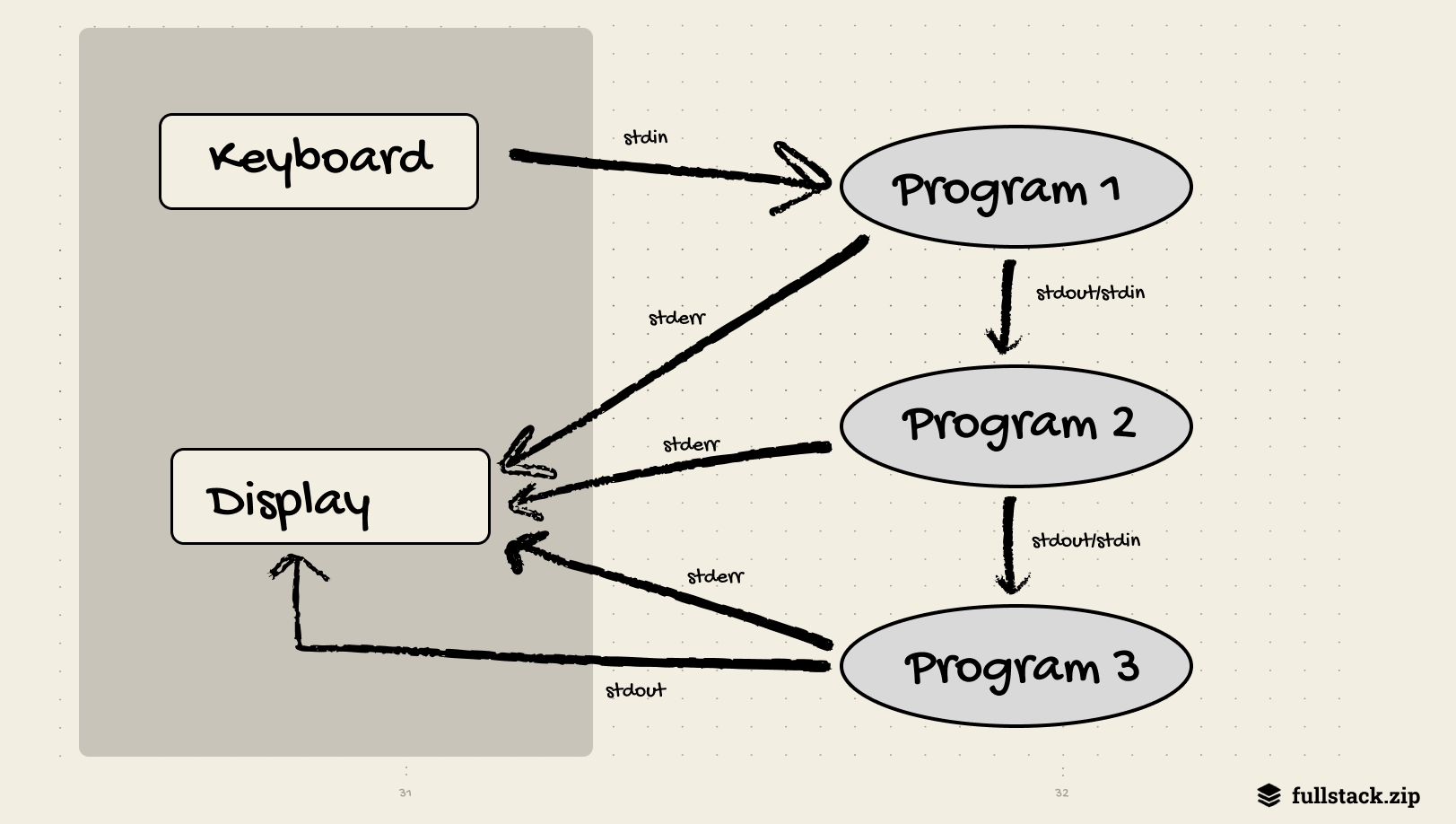
Pipes
The most obvious precedent is the pipe. In 1964, Douglas McIlroy wrote an internal Bell Labs memo proposing that programs be linked “like a garden hose — screw in another segment when it becomes necessary to massage data in another way.” He envisioned software as interchangeable components connected through data streams. The idea sat dormant for nearly a decade before Ken Thompson implemented pipes as a core Unix feature in 1973.
ps aux | grep chrome  # is chrome running?
ls -1 | wc -l         # how many files in cwd?
This idea had the power to extend further. Imagine your email and projects being piped into your calendar, and then to your team’s combined data lake. However, platforms are disincentivized to share: Google Drive and Dropbox don’t want to share the same files. Perhaps AI will revive this idea. You could imagine that all apps tap into a shared phone context, rather than each having its own data.
The idea that complex work should be expressed as a chain of discrete, single-purpose steps where the output of one becomes the input of the next is the foundation of every CI pipeline ever run. The stages: keyword is the same idea in different clothes: break your build process into named phrases, run them in order, and let each phase’s artifacts flow into the next.
DAG Scheduling
GitLab’s needs: keyword lets you write pipelines like this:
build:
  stage: build

unit-tests:
  needs: [build]

integration-tests:
  needs: [build]

deploy:
  needs: [unit-tests, integration-tests]
This is a Directed Acyclic Graph (DAG) — a graph of dependencies with no cycles, where the sort of nodes gives you a valid execution order. Multi-step projects are represented as directed graphs so that the longest sequence of dependent tasks (the “critical path”) becomes clear. This allows operators to find where work could be parallelized without delaying the overall timeline. The strategy was used to schedule chemical plants and coordinate the Polaris missile program.
GitLab’s job scheduler does the same thing. ProcessPipelineService evaluates the job DAG on every status change, unblocking downstream jobs the moment their dependencies complete.
The specific algorithm is Kahn’s topological sort, published in 1962: repeatedly select nodes with no incoming edges, emit them, remove them from the graph, repeat. Every CI scheduler does some variant of this.
Optimistic Concurrency Control
What if hundreds of runners simultaneously call POST /api/jobs/request, causing multiple Rails processes to receive these requests concurrently? How can they ensure that the same pending job is not handed to two runners at once?
The naive, pessimistic answer is a global lock: before selecting a job, lock the table, pick one, mark it running, unlock. This works, but at scale, it creates a queue of Rails processes waiting for the lock, and throughput tanks. Even if deadlocks are avoided, this locking limits concurrency.
Optimistic Concurrency Control (OCC), formalized in 1981, is an alternative that works well in environments with low data contention. The premise: instead of locking preemptively, assume conflicts are rare, proceed without locking, and detect conflicts at commit time.
In practice, GitLab’s RegisterJobService does this:
UPDATE ci_builds
SET    status = 'running',
       runner_id = $1,
       lock_version = lock_version + 1
WHERE  id = $2
  AND  status = 'pending'
  AND  lock_version = $3;  -- ← the OCC check
If another Rails process already picked this job (incrementing lock_version), this UPDATE matches zero rows. The service detects the miss and returns 204 No Content to the runner, which simply tries again on the next poll cycle. No deadlock, global lock, or serialization. Conflicts are rare, and when they do occur, only one poll cycle is wasted.
Where things go from here
Everything here assumes a human pushes code, waits for a runner, and sits around waiting for a green check.
That workflow is starting to feel antiquated.
If n agents are committing to n worktrees simultaneously, doesn’t it seem odd for them to poll and coordinate complex trains?
I think the primitives — pipes, DAGs, OCC — will stay, but the workflows built on top of them will look very different.
Whatever happens, one thing is certain: having a reliable and fast way to evaluate code is always going to be important.
Recommended Reading
GitLab’s Architecture | fullstack.zip | Stack and overview
Unix Pipeline History | Wikipedia
The Bell System Technical Journal | 1978 | McIlroy’s philosophy
Directed Acyclic Graph | Wikipedia
On Optimistic Methods for Concurrency Control | Harvard | The original 1981 paper.
Optimistic Concurrency Control | Wikipedia
The more I learn about git and CI, the more convinced I become that they're both about to be replaced.
Anyone disagree?