
GitLab's Architecture: A Technical Deep Dive
How a boring monolith powers the world's largest independent DevOps platform

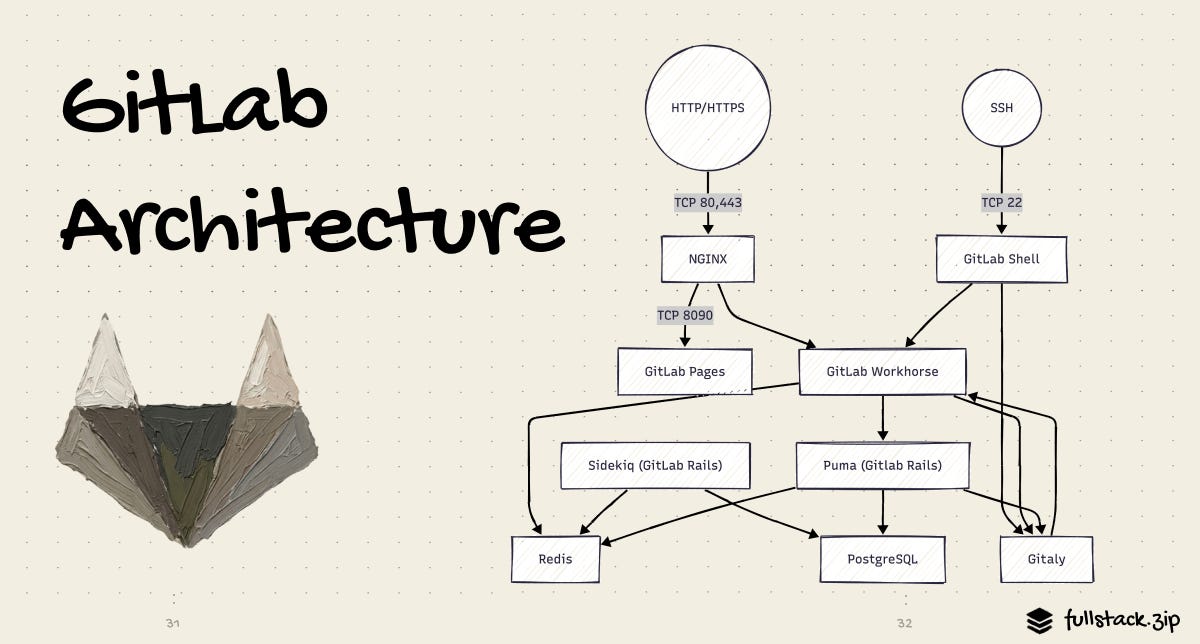
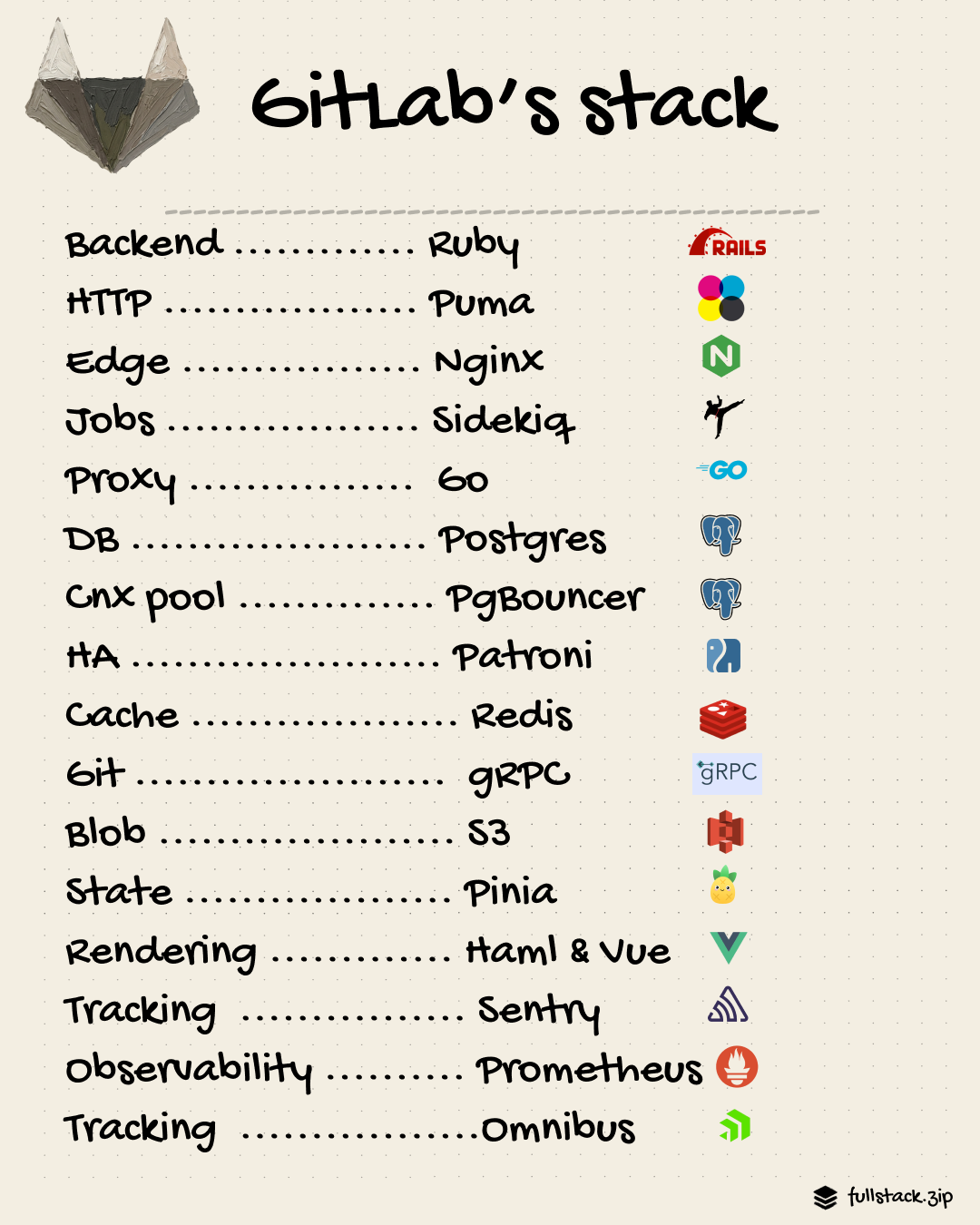
TL;DR - It’s a modular monolith built on this stack:
Backend: Ruby on Rails
HTTP server: Puma (Ruby web server)
Edge: Nginx
Reverse proxy: Go service (Workhorse)
Background jobs: Sidekiq (Ruby framework)
DB — primary: PostgreSQL
DB — connection pooling: PgBouncer
DB — high availability: Patroni
Cache: Redis
Blob: AWS S3
Frontend — state: Pinia (Vue store), Immer (immutable cache),
API: GraphQL (Apollo) + REST
Observability: Prometheus & Grafana
Error tracking: Sentry & OpenTelemetry
Deployments: GitLab Omnibus (Omnibus fork)
GitLab is what happens when you commit to the monolith. Its CI/CD, security scanner, issue tracker, and deployment toolchain are bundled into one product rather than five held together with webhook glue. The stack isn’t flashy either: a large Ruby on Rails app, Postgres, Redis, and a handful of Go services.
No Kafka, event-sourcing, mesh of 200 microservices. Instead, GitLab maintains its modularity through discipline and radical transparency.
This article traces the path from your git push command to the DB and back, ending with an explainer of how GitLab monitors all of it in prod, and where the architecture is headed.
What Is GitLab?
If you have never used GitLab (shame), here’s the gist.
It’s a platform for software teams. At its core, it hosts Git repos. On top of that, it adds CI/CD pipelines (automated build, test, and deploy workflows), merge requests, issue tracking, container registries, and security scanning, all in one application.
Unlike GitHub, which relies on a marketplace of third-party integrations for CI/CD, GitLab ships all of this natively. This “one-app-to-rule-them-all” stance is what shapes many of the architectural choices described in this article.
It’s also open-source.
The Glossary
GitLab introduces a lot of proper nouns. Before going further, here’s the cheat sheet. We will cover each of these in depth later.
+-------------+-----------------------------------------------------------+---------+
| Name        | What It Does                                              | Built In|
+-------------+-----------------------------------------------------------+---------+
| Puma        | Multi-threaded web server. The main application           | Ruby    |
|             | engine: receives web requests, runs business logic,       |         |
|             | reads and writes the database.                            |         |
+-------------+-----------------------------------------------------------+---------+
| Workhorse   | Go reverse proxy sitting in front of Puma. Handles        | Go      |
|             | slow, heavy I/O so Ruby does not have to: git push/pull   |         |
|             | over HTTPS, large file uploads, CI log streaming,         |         |
|             | artifact downloads.                                       |         |
+-------------+-----------------------------------------------------------+---------+
| GitLab Shell| Handles SSH connections for git push/pull. Authenticates  | Go/Ruby |
|             | the user, then hands the git operation to Gitaly.         |         |
+-------------+-----------------------------------------------------------+---------+
| Gitaly      | gRPC service that owns all Git data on disk. Replaced     | Go      |
|             | a brittle NFS-shared filesystem. Every git read/write     |         |
|             | goes through Gitaly RPC calls — nothing touches the git   |         |
|             | repos directly.                                           |         |
+-------------+-----------------------------------------------------------+---------+
| Praefect    | Load-balancing replication proxy for Gitaly. Sits in      | Go      |
|             | front of a cluster of Gitaly nodes, enforces quorum       |         |
|             | writes, and handles automatic failover.                   |         |
+-------------+-----------------------------------------------------------+---------+
| Consul      | Service registry. Holds the current topology of the       | Go      |
|             | Postgres cluster so that PgBouncer can find the primary   |         |
|             | after a failover without any human intervention.          |         |
+-------------+-----------------------------------------------------------+---------+
| Geo         | Multi-site replication. Secondary sites mirror the        | Ruby/Go |
|             | primary for read performance and disaster recovery.       |         |
+-------------+-----------------------------------------------------------+---------+
| GitLab      | Standalone Go binary that organizations deploy            | Go      |
| Runner      | wherever jobs should run: their own servers, a cloud      |         |
|             | account, a Kubernetes cluster. Polls GitLab for           |         |
|             | pending CI jobs and executes them.                        |         |
+-------------+-----------------------------------------------------------+---------+
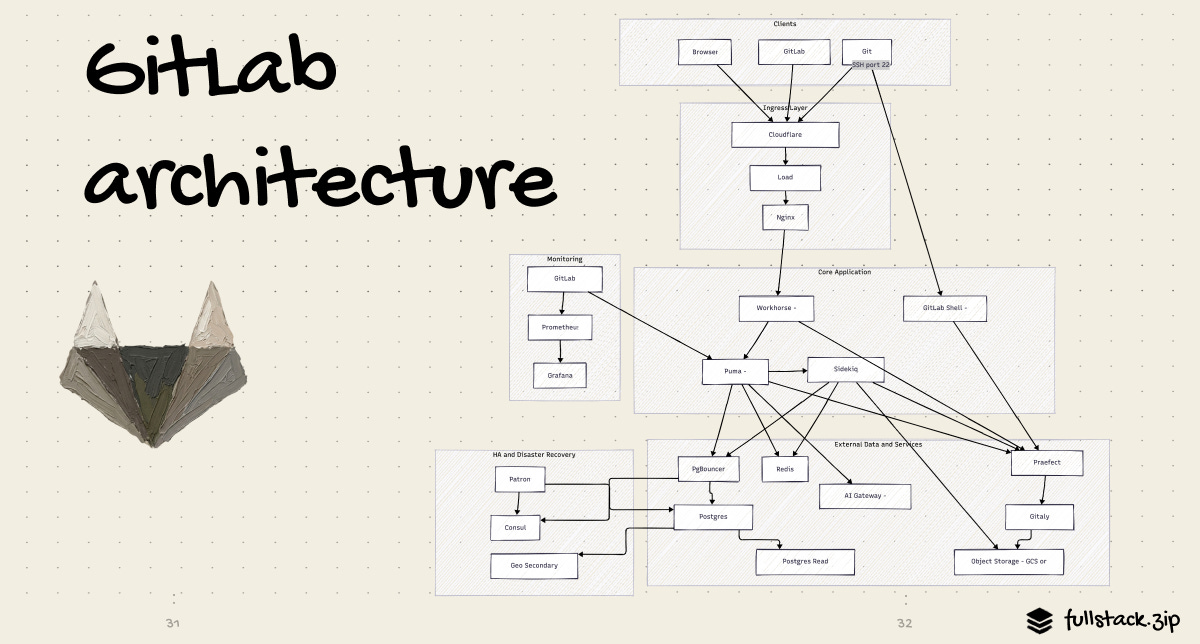
The Full Picture
This is the end-to-end architecture. Every section below zooms into one layer of it.
Layer 1: Client to Ingress
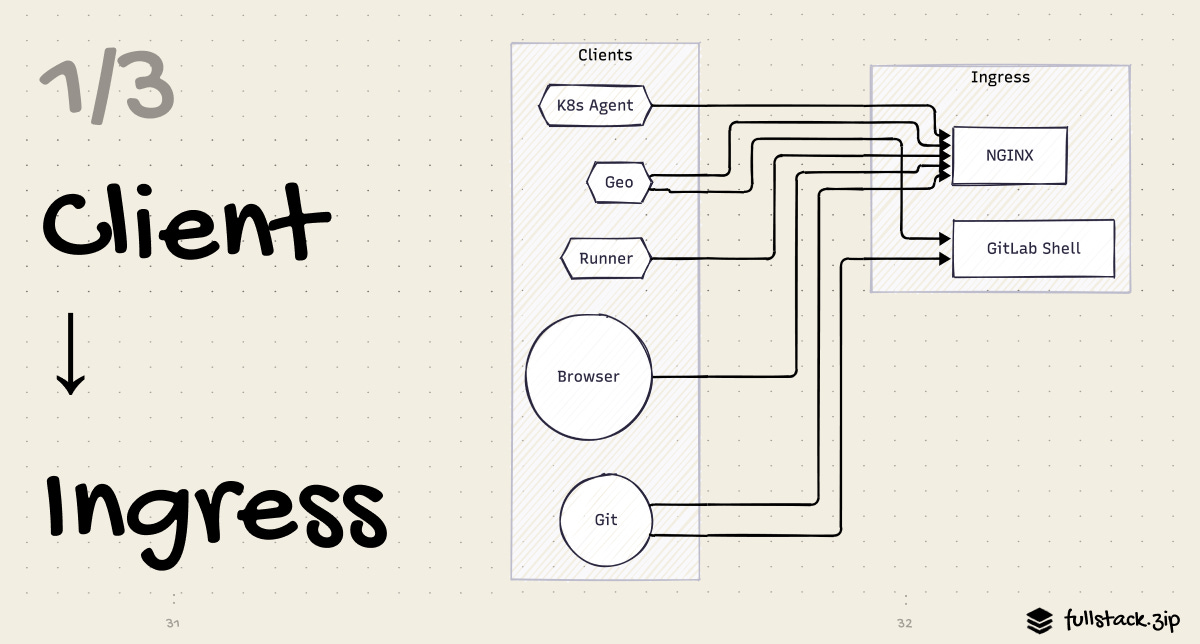
Most traffic comes in over HTTPS and goes through the same ingress path. The exception is SSH, which we will discuss at the end of this section.
Cloudflare: The Front Door
Every request to GitLab.com hits Cloudflare first, which gives them a firewall, DDoS protection, a CDN, and TLS termination. We’ll break down Cloudflare in its own issue, so let’s leave it at that for now =]
Nginx: The Gateway
Nginx receives HTTP requests from the load balancer and routes them to Workhorse. It handles a few things here:
TLS termination for self-managed installs where Cloudflare is not in front
Static file serving for anything that lives on disk, like uploads that have not yet been moved to object storage
Rate limiting headers, enforced in conjunction with GitLab’s Redis backend rate limiter
Request routing — Nginx sends everything to Workhorse, which will decide what to do next
Nginx is intentionally thin here; it is not doing complex business logic. Its job is to be a fast, reliable conduit to the Workhorse.
The SSH Path: GitLab Shell
To retain the real hackers, GitLab also allows SSH connections, which bypass Nginx entirely. A git push git@gitlab.com:user/repo.git connects directly to GitLab Shell on port 22.
GitLab Shell is a small Go app that acts as a restricted SSH shell. When your SSH client connects, it reads your public key, calls the GitLab API to verify the key belongs to an authorized user, then hands off the git pack data to Gitaly for storage. It never actually lets you get a general shell prompt — it only accepts git-specific commands (lame).
Layer 2: Ingress to Core
Once a request passes through Nginx, it reaches the core application layer — the part that actually understands what the user is trying to do.
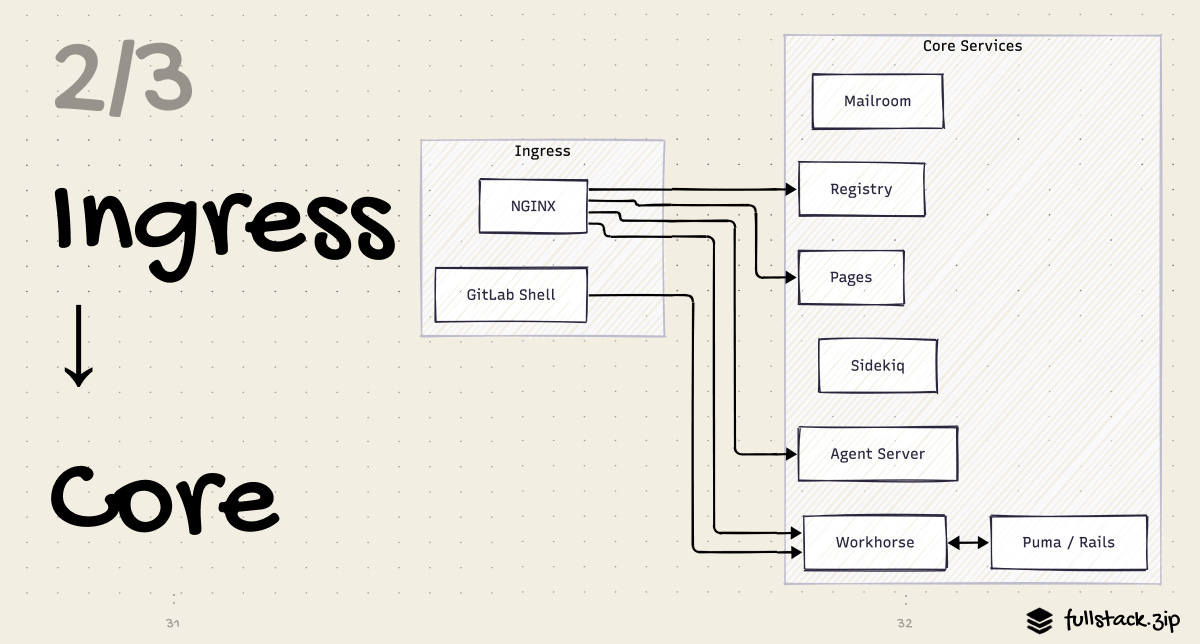
Workhorse: The Smart Proxy
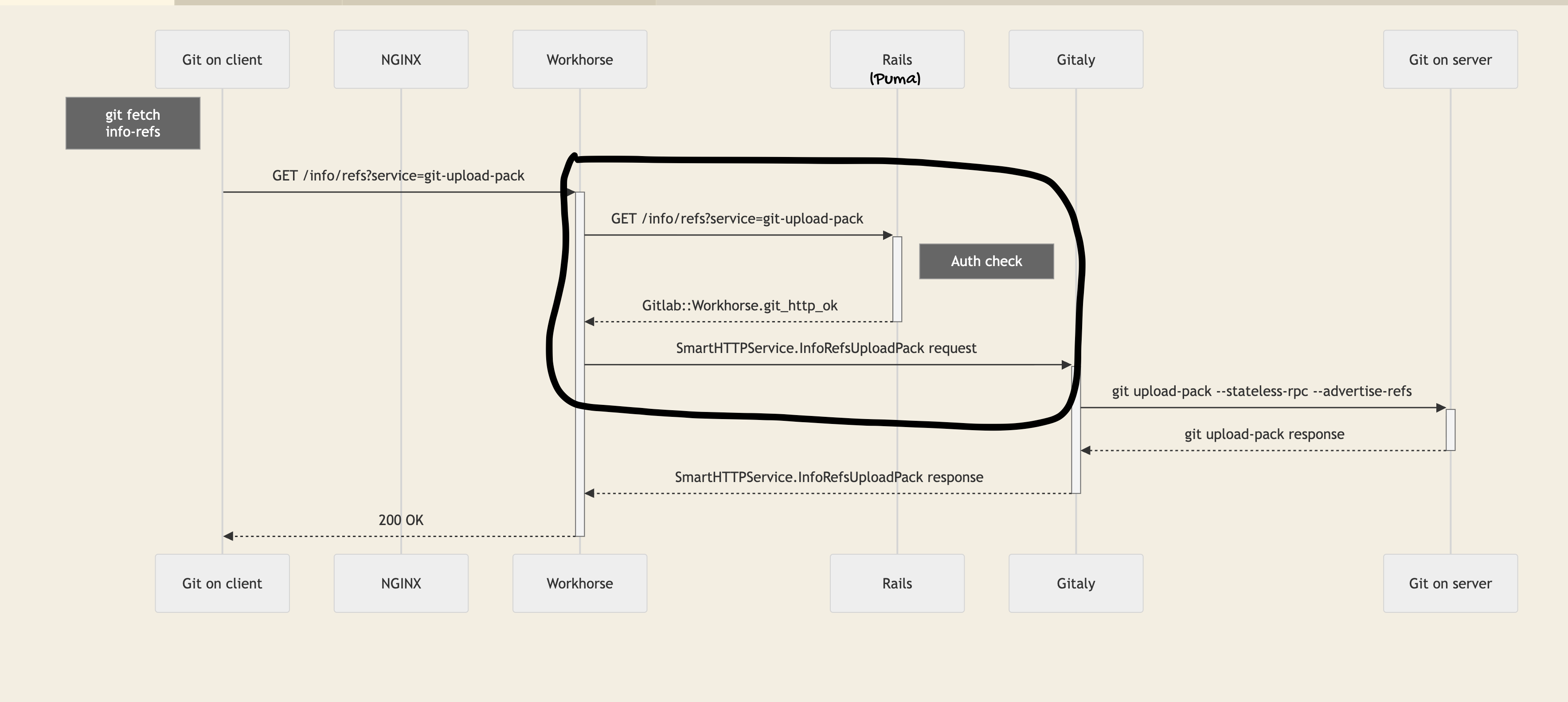
Workhorse is a Go service that sits between Nginx and Puma. In addition to normal reverse proxy duties, it has a specific job: keep slow I/O away from Ruby threads.
Ruby has a Global Interpreter Lock (GIL) that limits true parallelism. Tying up a Ruby thread on a slow upload or a long git-pack operation is expensive, preventing that thread from serving other requests while it waits. Workhorse exists to prevent this.
The communication between Workhorse and Puma is slightly unusual.
While the standard reverse proxy request goes like this:
client -> proxy -> app -> proxy -> client…adding Workhorse into the mix makes it go like this:
client -> Workhorse -> Puma -> Workhorse -> app -> Workhorse -> clientWorkhorse forwards the request to Puma. Puma processes the request and then replies with special headers (X-Sendfile, X-GitLab-Git-HTTP-Session). Workhorse uses those to hijack the response and send it directly to the client.
Basically, Puma tells Workhorse what to do via response headers, and Workhorse takes it from there.
Workhorse is responsible for:
Git HTTP operations — git push and pull over HTTPS. It streams the pack data directly to and from Gitaly via gRPC, without routing the raw bytes through Ruby
File uploads — when you upload an attachment, Workhorse buffers the multipart upload and either stores it temporarily on disk or streams it directly to object storage, then notifies Puma that the upload is complete.
Artifact downloads — when you download a CI artifact, Workhorse fetches it from object storage and streams it to your client, again without involving Puma
CI log tailing — while a job runs, Workhorse streams log chunks from Redis to the browser in real time.
This is weird, but it frees the Puma thread immediately instead of making it wait for I/O to finish.
Puma: The Rails Application Engine
Puma is where the actual GitLab application runs. It is a multi-threaded Ruby HTTP server running the GitLab Rails app — a large codebase that handles:
Authentication & authorization (who is this user, can they see the code)
Reading and writing to PostgreSQL (user records, merge requests, issue data)
Reading and writing to Redis (sessions, locks, cache, real-time events)
Calling Gitaly via gRPC for repository operations (list branches, read a file, get a diff)
Enqueuing Sidekiq background jobs for any work that does not need to happen synchronously
Rendering the HTML, JSON, or GraphQL response
Puma scales horizontally: add more Puma nodes behind the load balancer, and throughput increases linearly (because Puma nodes are stateless). Sessions live in Redis. Nothing lives on the Puma host that cannot be reconstructed.
The Rails app is organized in a monolithic codebase, but it’s nevertheless modular. Each domain manages its own models, services, and API endpoints. This provides the DX benefits (easy to run locally, shared tooling, fewer network hops) while keeping the blast radius of any given change small.
Sidekiq: The Background Worker
Not everything needs to happen before the user sees a response. Sending a notification email, updating a downstream pipeline status, archiving a CI log to object storage — these are all better handled asynchronously.
Sidekiq is GitLab’s background job processor for this type of work. It runs as a separate process (or many processes at scale), reads job payloads from Redis queues, and processes them independently from the web request cycle.
When Puma wants to fire off async work, it enqueues a job — a small JSON payload describing a Ruby class and its arguments — into a Redis list. Sidekiq workers are sitting in a loop pulling from those lists. They pick up the job, execute the Ruby code, and either mark it complete or retry it on failure.
Puma (on a request):
  1. Process MR comment creation
  2. Write comment to PostgreSQL
  3. Enqueue NotificationWorker ---->    Sidekiq (background):
  4. Return 201 to user                  1. Pull NotificationWorker job from Redis
     (~40ms)                             2. Load recipients from PostgreSQL
                                         3. Send emails via SMTP
                                         4. Mark job complete
                                         (~2 seconds, who cares)
At GitLab.com scale, Sidekiq is not one process — it’s a fleet of workers, each configured with specific queue assignments. CI state-transition workers run on dedicated Sidekiq fleets so that a slow email-delivery worker does not hold up the CI queue (a lesson learned the hard way).
Layer 3: Core to External Services
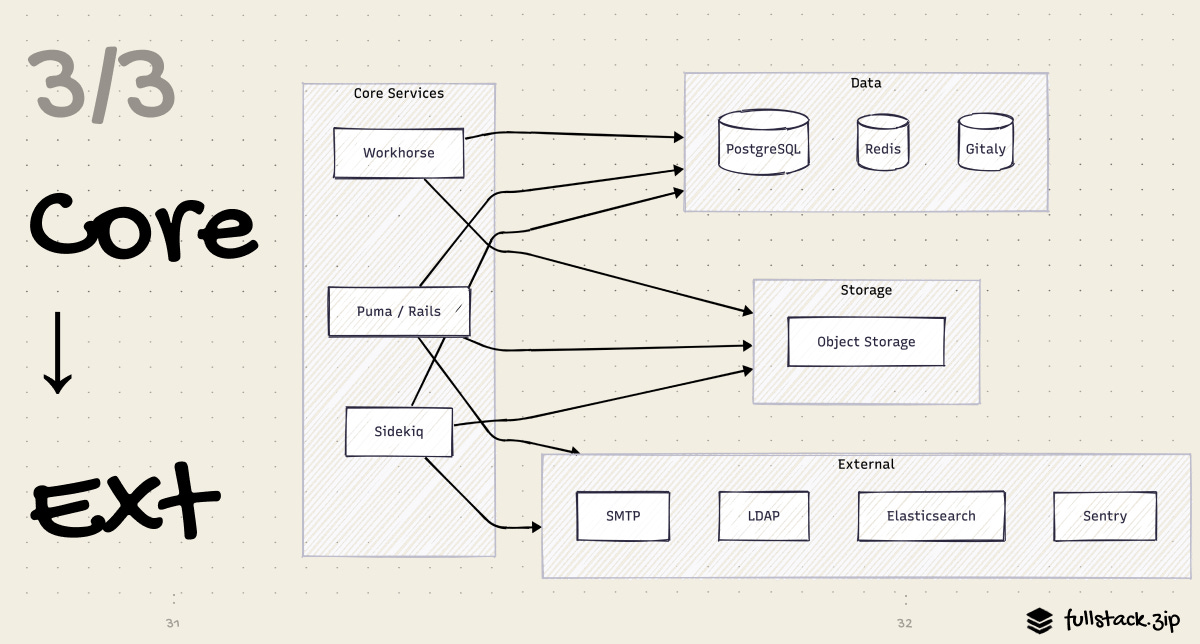
Remember that the app tier does not hold state. It delegates to a set of purpose-built external services. Let’s learn what each of these star players does.
PostgreSQL: The System of Record
Every structured piece of app data lives in Postgres: users, projects, groups, issues, merge requests, CI pipelines, job records, artifact metadata, permissions — all of it. It’s the authoritative source of truth.
GitLab.com doesn’t connect to Postgres directly, however. It goes through PgBouncer, a connection pooler that multiplexes thousands of connections down to a manageable pool. Without it, a Puma/Sidekiq fleet of hundreds of processes would each try to hold open a database connection, quickly exhausting Postgres’s connection limit.
GitLab also uses read replicas — secondary Postgres nodes that receive a streaming copy of all writes from the primary. Read-heavy operations like loading a project’s issue list or rendering a dashboard can be routed to replicas, offloading the primary for write-heavy work.
Redis
GitLab uses Redis as eight logically distinct stores, each with different operational requirements and eviction policies.
+------------------------+-------------------------------------------+------------------+
| Instance               | Stores                                    | OK to Lose?      |
+------------------------+-------------------------------------------+------------------+
| queues                 | Sidekiq job payloads, retry state         | No - jobs lost   |
| shared_state           | Distributed locks, exclusive leases       | No - race conds  |
| sessions               | User login sessions                       | No - logged out  |
| actioncable            | WebSocket pub/sub for real-time UI        | Mostly fine      |
| trace_chunks           | In-flight CI job log bytes                | Mostly fine      |
| cache                  | Computed Rails.cache data                 | Yes - rebuildable|
| rate_limiting          | Request counters per IP/user              | Yes - rebuildable|
| repository_cache       | Branch and tag name lists                 | Yes - rebuildable|
+------------------------+-------------------------------------------+------------------+
Cache instances use an LRU eviction policy: when they fill up, the least-recently-used keys are evicted. That is the correct behavior for a cache. (Imagine you applied LRU eviction to the queues instance: Sidekiq jobs would silently disappear from the queue before being processed!)
On a small self-managed instance, one Redis process handles everything. On GitLab.com, these are fully separate clusters, sized and scaled independently. This ensures that when the CI system generates a spike in trace chunk writes, it does not compete with session storage.
Gitaly: RPC for Git
Early GitLab stored git repositories on a shared NFS filesystem. Every Puma and Sidekiq node would mount the NFS volume and call git commands directly on disk. This worked, up to a point. As scale grew, the limitations became painful: NFS latency spikes, split-brain risks on failover, no way to observe what git operations were running or how long they took.
Gitaly eventually replaced NFS. It is a gRPC service — you call it via a typed remote procedure call (RPC) interface, not by shelling out git on a shared filesystem. Every git operation in GitLab now translates to a Gitaly RPC:
To get a MR diff, Rails calls
Gitaly.CommitDiff(repo, from_sha, to_sha). Gitaly streams diff hunks back as gRPC messages.To list branches, Rails calls
Gitaly.FindAllBranches(repo). Gitaly reads from disk, returns structured branch dataTo git push over HTTP: Workhorse calls
Gitaly.PostReceivePack(repo, pack_data). Gitaly writes objects, updates refs, runs server-side hooks.
Because every git operation is a discrete, typed RPC, Gitaly can be monitored, load-balanced, and independently scaled in a way that NFS never could have.
Object Storage: Keeping Blobs Separate
Not everything fits neatly in a Postgres row. CI artifacts (binaries, test reports, logs), Git LFS files, container images, uploaded attachments, and archived job logs are binary blobs that can be gigabytes in size.
Storing this in Postgres, while technically possible, would inflate table sizes, make backups slow, and force blob I/O through the same connection pool as structured queries.
GitLab sanely puts all blobs in object storage — GCS on GitLab.com, S3 on self-managed installs. The DB holds only a pointer (a storage path and some metadata). When you download a CI artifact:
Browser ──► Workhorse ──► Rails (auth check only)
                              │
                              │  "This artifact lives at
                              │   gs://artifacts-bucket/job/42/artifact.zip"                    "
                              │
                              ▼
                         Workhorse generates a presigned URL
                         or proxies the stream directly from GCS
                         to the browser
The auth check is instantaneous. The actual data transfer happens between Workhorse and GCS, with no Puma thread blocked waiting for bytes. Another example of using Puma for what it’s good at (HTTP) and avoiding it for I/O.
The AI Gateway: Model Routing for Duo
GitLab Duo is the umbrella name for AI features: code suggestions, chat, root-cause analysis for failed CI pipelines, security vulnerability explanations, and so on. All of these features funnel through a centralized AI Gateway — a standalone Python/FastAPI service that routes requests to the right model.
Rails/Sidekiq
      │
      ▼
AI Gateway (FastAPI)
      ├──► Anthropic Claude   (code generation, chat)
      ├──► Google Vertex AI   (various tasks)
      └──► Self-hosted models (for enterprise customers)
Why a gateway rather than Rails calling model providers directly? A few reasons. The Gateway creates one point of control for rate limiting, cost accounting, model versioning, and provider fallback across all deployment types. When GitLab wants to swap one model provider for another or A/B test two models, they change it in one place. Self-managed customers do not need to configure cloud provider credentials for every AI feature separately; they just connect to the Gateway.
External Services: The Outside World
GitLab also talks to a set of external systems that are not “part of GitLab” per se but are deeply integrated:
SMTP servers — for sending email notifications (Sidekiq-dispatched)
OAuth providers — Google, GitHub, SAML, etc for SSO
LDAP / Active Directory — for enterprise users provisioning and group sync
Kubernetes API — for the GitLab agent for k8s, used for deployments and cluster management
Container registries — GitLab’s built-in registry uses a separate service
gitlab-registry), based on Docker.Webhook targets — when you configure a GitLab webhook, Sidekiq makes an outbound HTTP request to your configured endpoint on relevant events
We’ve covered the main building blocks of GitLab. The following explains the connective tissue and peripheral bits that make everything come together in prod.
High Availability
How GitLab eliminates single points of failure at every layer of the stack.
Application HA
Stateless nodes. Puma and Sidekiq nodes hold no local state. User sessions live in Redis. Uploaded files live in object storage. If a Puma node dies, the load balancer routes traffic to the remaining nodes before users ever notice — their session is still valid because it was in Redis all along. Adding capacity is equally painless: spin up more nodes and register them with the load balancer. No data migration needed.
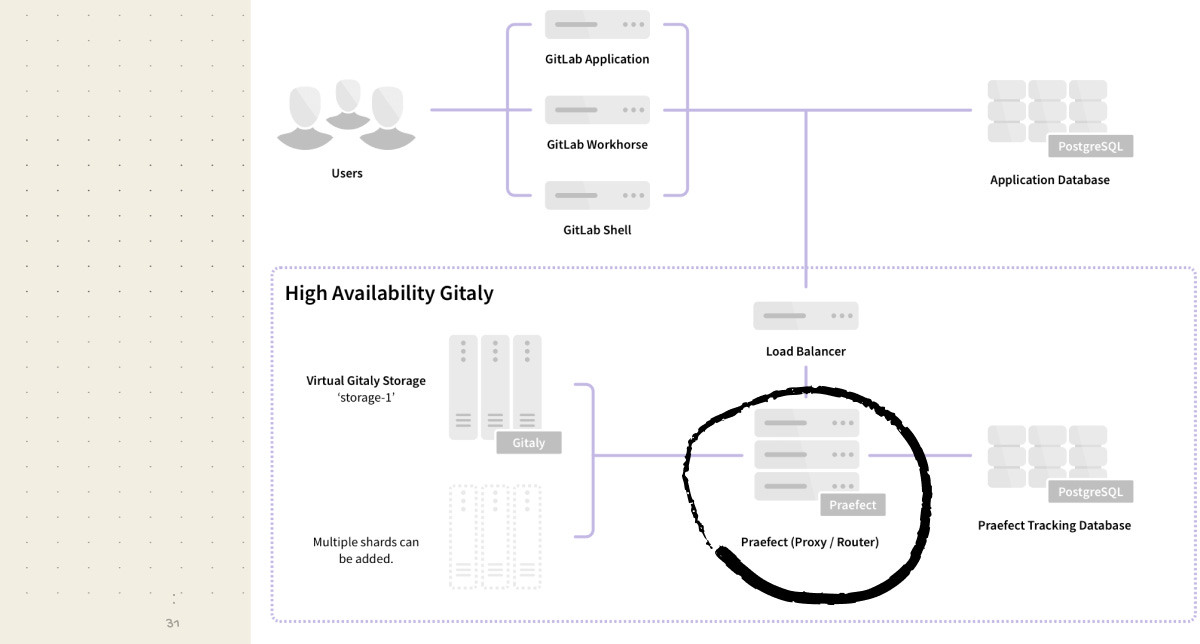
Praefect adds high-availability (HA) on top of Gitaly. It is a proxy that sits in front of a cluster or Gitaly nodes. On a write, Praefect sends the operation to all nodes and waits for a quorum to confirm before returning success. This is “strong consistency,” meaning you can read from any Gitaly replica immediately after a write and get the correct data. When a Gitaly node fails, Praefect promotes a replica automatically.
DB HA: Patroni + PgBouncer + Consul
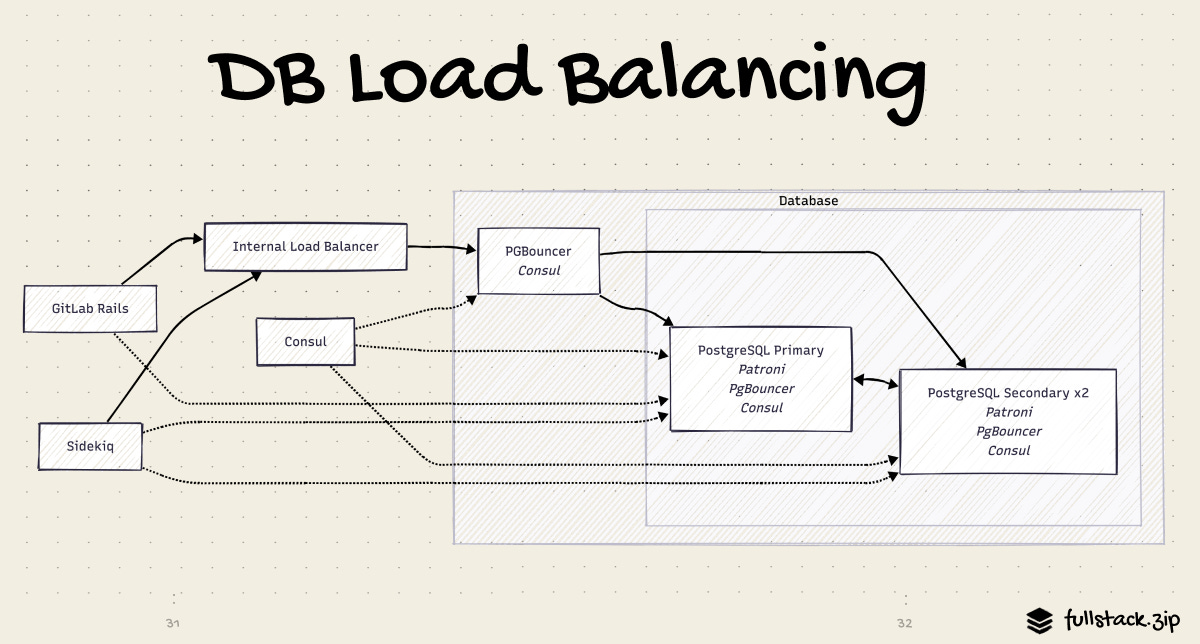
Patroni runs on each Postgres node. It manages leader election, monitors health, and handles automatic failure. If the primary becomes unreachable, Patroni elects a new primary within seconds. It broadcasts the result to Consul, the service registry. PgBouncer watches Consul, so it knows to point new connections at the primary without any restart. Application nodes never need to know which host is primary; they always talk to PgBouncer.
Failover typically completes in under 30 seconds. Applications experience a brief pause as PgBouncer re-routes, then continue normally.
Gitaly HA: Praefect Cluster with Quorum Writes
Praefect is a router and transaction manager for Gitaly.
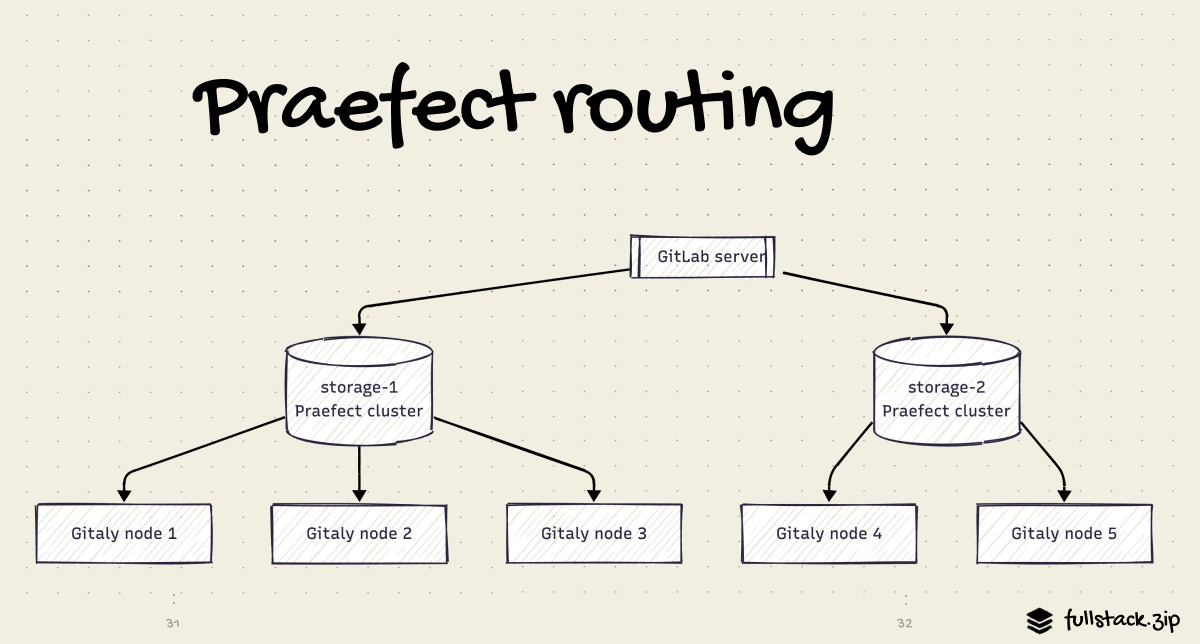
On writes, Praefect sends the operation to all Gitaly nodes and waits for a quorum (majority) to confirm before reporting success. This means you can read from any replica immediatly after a write and see the latest data — no stale reads. If the primary Gitaly node fails, Praefect promotes a replica and resumes service automatically.
Praefect maintains its own small Postgres DB (separate from GitLab’s main Postgres) to track replication state. A full HA deployment ends up with two Postgres clusters: one for GitLab app data, one for Praefect.
Redis HA: Sentinel Mode
Each Redis instance in a HA deployment runs with Redis Sentinel: a primary Redis with replicas, monitored by at least three Sentinel processes. If the primary fails, Sentinels elect a new primary and notify clients to reconnect. Application nodes are configured to discover the current primary through Sentinel rather than connecting to a fixed host.
One constraint worth knowing: Redis Cluster (Redis’s own horizontal-sharding mode) is not supported for all GitLab Redis uses. The trace_chunks instance uses a data structure that is incompatible with Redis Cluster’s key-slot sharding. All GitLab Redis instances therefore use Sentinel mode, not Cluster mode.
Site Level Recovery: GitLab Geo
What happens if the entire primary data center goes offline? How do developers in Asia-Pacific stop having 300ms latency every time they run git clone against a server in Virginia?
GitLab’s answer: Geo, a warm-standby for distributed teams. Geo provides local caches that can be placed geographically close to remote teams, which can serve read requests. This can reduce the time it takes to clone and fetch large repositories.
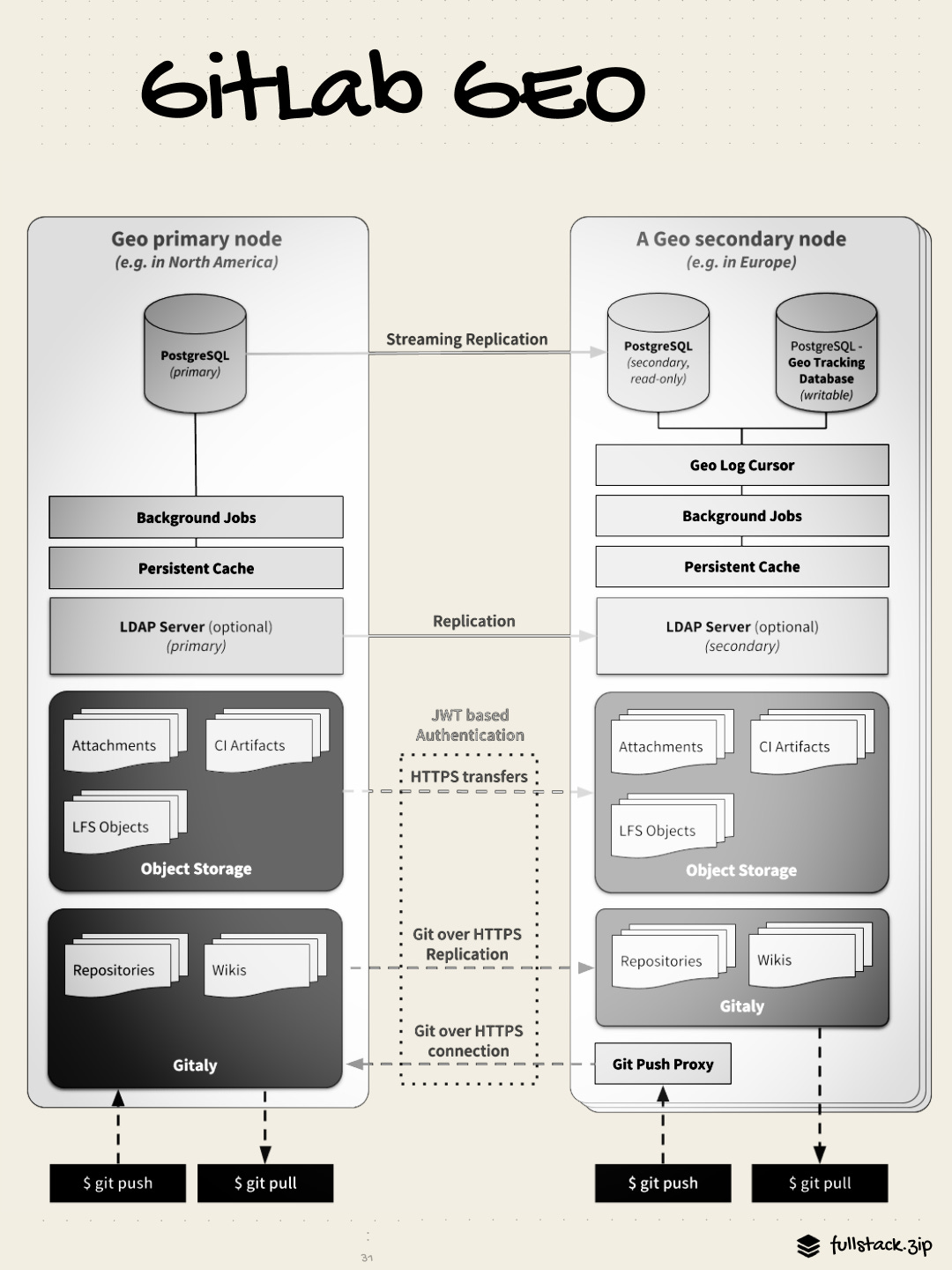
The secondary site gets Postgres via standard streaming replication — a continuous, near-real-time copy of every write. Git repos are synced by the Geo Log Cursor daemon, a separate process that reads the log and enqueues background jobs to clone or fetch updated repos from the primary via HTTPS.
Replication is async — there is always some lag, usually measured in seconds. For disaster recovery, planned failover waits for full synchronization before promoting the secondary. Zero data loss. Emergency failover can be forced immediately. In this case, some data written in the last few seconds may be lost.
Monitoring: How GitLab Knows When Things Break
A system with this many parts will have failures. The question is how quickly they can be detected, and how much context you’ll have to start troubleshooting.
GitLab’s observability stack covers three domains: metrics (what is happening now), logs (what happened when), and traces (specific request tracking).
Metrics: Prometheus and Grafana
Every GitLab component exposes a Prometheus metrics endpoint. The in-process GitLab Exporter scrapes the running Rails app and produces application-level metrics. Prometheus collects and stores all of these on a regular scrape interval. Grafana provides dashboards and alert routing.
Key metrics the team monitors:
+----------------------------+-----------------------------------------------+
| Metric                     | What It Tells You                             |
+----------------------------+-----------------------------------------------+
| HTTP request rate/latency  | Is the web tier healthy? Latency spikes       |
| by controller action       | point to slow DB queries or Gitaly RPCs       |
+----------------------------+-----------------------------------------------+
| Sidekiq queue depth        | Are jobs piling up? Indicates under-capacity  |
| by queue name              | or a worker that is stuck                     |
+----------------------------+-----------------------------------------------+
| Sidekiq job latency        | Time from enqueue to start. High latency      |
| by worker class            | = queue starvation                            |
+----------------------------+-----------------------------------------------+
| Gitaly RPC latency         | Git operation performance. Spikes indicate    |
| by RPC name                | disk I/O issues on Gitaly nodes               |
+----------------------------+-----------------------------------------------+
| PostgreSQL connection      | Is PgBouncer saturated? Are we running out    |
| pool saturation            | of Postgres connections?                      |
+----------------------------+-----------------------------------------------+
| CI queue depth             | Pending jobs waiting for a runner. High       |
| by runner type             | values = runner fleet under-capacity          |
+----------------------------+-----------------------------------------------+
| Redis command latency      | Cache/queue slowness. Usually indicates       |
|                            | memory pressure or network issues             |
+----------------------------+-----------------------------------------------+
| Error rate by service      | Rolling count of 5xx responses. The canary    |
|                            | for most application-level problems           |
+----------------------------+-----------------------------------------------+
Logs
Every component in GitLab emits structured JSON logs. The critical piece is the correlation ID: a UUID assigned to each incoming request by Workhorse, stamped into every log generated anywhere in the call chain — Rails, Gitaly, Sidekiq, all of ‘em.
{
  "method": "POST",
  "path": "/api/v4/jobs/request",
  "status": 200,
  "duration_s": 0.043,
  "correlation_id": "01HXKG4P8B3QV7N6J2MZ", // <-- important
  "user_id": 1234,
  "meta.caller_id": "Ci::RegisterJobService",
  "db_duration_s": 0.012,
  "redis_calls": 3,
  "gitaly_calls": 0,
  "queue_duration_s": 0.001
}
When an on-call engineer sees a latency spike on a Grafana dashboard, they grab the correlation ID of an affected request and use it as a filter key across all log sources — Elasticsearch, Splunk, Loki, whatever the install uses.
Tracing: OTEL
Metrics tell you what is slow. Logs tell you when the slowness happened. Distributed traces tell you why by showing the exact sequence of service calls and how long each one took.
GitLab uses OpenTelemetry-compatible tracing. The correlation ID doubles as the trace ID here. A slow pipeline creation request might produce a trace like:
POST /api/v4/projects/123/pipeline   847ms total
  ├── Auth check (Redis)              3ms
  ├── Project load (Postgres)         8ms
  ├── YAML fetch from Gitaly         22ms    ← Gitaly.GetFile RPC
  ├── YAML parse and rule eval        41ms
  ├── Pipeline write (Postgres)       15ms
  ├── Stage+job row inserts          180ms   ← this is the bottleneck today
  ├── Sidekiq enqueue (Redis)         4ms
  └── Response serialization         12ms
Interestingly, this distributed tracing is still considered “experimental” at the time of this article.
Error Tracking
Unhandled exceptions in Rails are captured and routed to GitLab’s error tracking system. GitLab uses its own built-in Error Tracking feature (which integrates with Sentry-compatible backends) as well as self-hosted Sentry for some teams. Errors are deduplicated, grouped by fingerprint, and surfaced with full stack traces and the request context (user, path, params) that caused them.
Error tracking events also carry the correlation ID, so you can jump from an error event directly to all logs from that specific request.
Scaling PostgreSQL
For those familiar with these real-world apps, things probably seem pretty straightforward up to this point; GitLab hasn’t tried to do anything cute or uniquely ambitious on the engineering side.
At their current scale, however, the PostgreSQL situation is getting untenable. They started by allowing horizontal cloning by making Puma & Sidekiq stateless. Then they decomposed CI tables into a separate DB, a multi-year effort that required forbidding cross-database JOINs in the Rails model layer and rewriting hundreds of queries.
Now they’re partitioning data by customer. This can’t be done via traditional sharding, because Postgres has no native sharding. CitusDB was evaluated and ruled out. Application-level sharding requires every query to know which shard to target, and makes cross-shard queries effectively impossible.
GitLab’s answer is Cells (interestingly, the same name Discord used for its similar abstraction). Instead of sharding rows in a database, they’ll run multiple independent copies of the entire application stack — each called a Cell — with a shared routing layer in front.
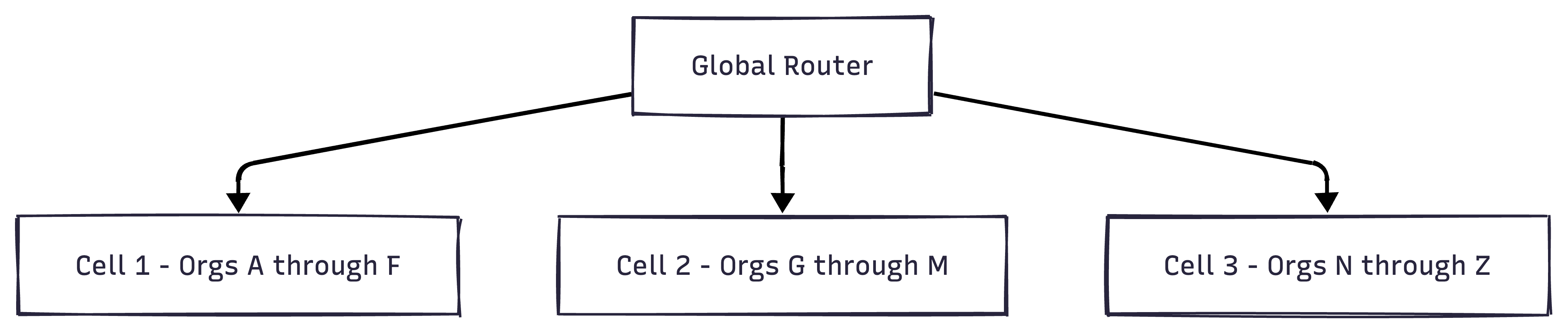
An org is assigned to exactly one Cell. The global router resolves which Cell handles each request based on the org in the URL. Each Cell is essentially a complete, isolated GitLab instance. Adding capacity means adding a new Cell — no resharding or cross-shard coordination.
The hard part is cross-cell operations: a user who belongs to orgs on two different cells, or a fork from a project on Cell 1 to Cell 2. These require a global identity layer and router that is still being designed.
They’re refreshingly transparent about this effort: you can track the project status, ADRs, and proposed architecture on their public handbook page (handbook.gitlab.com).
The “Boring” Takeaway
Perhaps you’ve been waiting for more complexity, the kind of juicy architectural optimization that makes the front page of HackerNews.
If that’s the case, GitLab ain’t for you.
The most interesting part about GitLab’s architecture is what isn’t there. No Kafka. No event sourcing. No distributed saga coordinator. No fancy message bus (yet). Their Z-axis scaling is being solved not with sharing but with what is essentially “run more copies of the whole app” lol.
Its monolithic codebase and the conventional tools that support it are simple, lean, pragmatic. They’ll extract and abstract, but only when warranted:
Gitaly was created when NFS-backed git storage became a liability
Workhorse was born when Ruby’s I/O throughout became the bottleneck for git operations
The CI DB was split when CI tables started consuming 40% of write traffic.
The monolith survives because it genuinely serves the product well: it is fast to develop, easy to test locally, straightforward to reason about, and naturally consistent within a single DB transaction.
This is a story of engineering sanity, not architectural fashion. And for 30 million users, it’s working just fine.
References
GitLab Architecture Overview — GitLab Docs | Canonical component diagram and service descriptions.
Reference Architectures — GitLab Docs | Tier-by-tier HA topologies from single node to 50k+ users.
Gitaly Cluster / Praefect — GitLab Docs | Replication proxy, quorum writes, and automatic failover.
Redis Development Guidelines — GitLab Docs | Multiple Redis instances, eviction policies, and use case separation.
Geo — GitLab Docs | Multi-site replication, the Geo Log Cursor, and failover procedures.
PostgreSQL HA with Patroni — GitLab Docs | Patroni, PgBouncer, and Consul HA topology in depth.
GitLab Scalability — GitLab Docs | AKF Scale Cube framing — X/Y/Z axes, current state, and gaps.
Multiple Databases — GitLab Docs | CI database separation and cross-database query restrictions.
Cells Architecture Blueprint — GitLab Handbook | Design, goals, and current status of the Cells initiative.
AI Architecture — GitLab Docs | AI Gateway design, Duo routing, self-hosted model support.
Find Relevant Log Entries with a Correlation ID — GitLab Docs | Correlation ID flow through Workhorse, Rails, Gitaly, and Sidekiq.
Log System — GitLab Docs | Structured JSON logging reference — all log files and their schemas.
Error Tracking — GitLab Docs | GitLab’s built-in Sentry-compatible error tracking integration.
GitLab Workhorse — GitLab Docs | Design rationale and feature set of the smart proxy layer.
Decomposing the GitLab Backend Database — GitLab Blog | The story of separating the CI database from main.
EE Feature Guidelines — GitLab Docs | How CE/EE code separation works at the Rails autoloader level.
How We Designed GitLab Reference Architectures — GitLab Blog | History and rationale of the reference architecture tiers.
Scaling Sidekiq at GitLab.com — GitLab Blog Lessons from specialized queue configuration at production scale.
GitLab Shell — GitLab Repository | SSH session handler.
AKF Scale Cube — AKF Partners | 2024 | The original X/Y/Z axes of scalability model GitLab references.
Does the 'boring monolith' approach have an expiration date, or can GitLab keep scaling this way indefinitely?